Getting here
Below we list some common ways to get to McMaster. Detailed information for all modes of transport are available on McMaster’s website.
From Toronto Pearson Airport
Option 1: GO Transit Bus
You can take a GO bus from Toronto Pearson Terminal 1 to McMaster University, although most trips involving transferring. To find routes, use GO Transit Trip Planner (https://www.gotransit.com/en/plan-your-trip) and enter:
From: Pearson International Airport Terminal 1
To: McMaster University
A one-way trip is around CAD $13.
Option 2: Tax/rideshare
Uber, Lyft, and taxis are available from Pearson.
An Uber from Pearson to McMaster is typically around CAD $110 depending on time of day, traffic, and demand.
By car
Directions
Drivers should follow directions to:
McMaster University
1280 Main Street West
Hamilton, Ontario
L8S 4L8
Parking
McMaster Parking Services uses Honk Mobile’s convenient mobile app or website for parking registration.
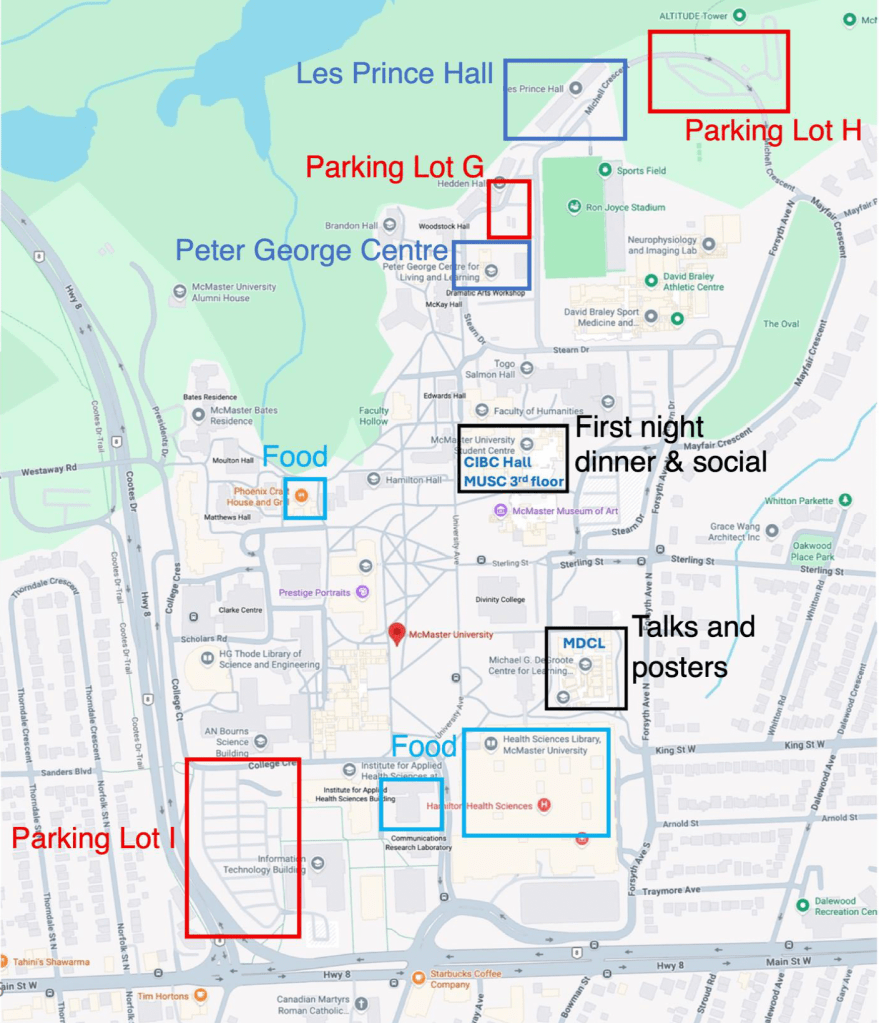
- Overnight parking for summer accommodation guests is available in LOT G and H. Rates are CAD $8/day on weekends, and CAD $12/day on weekdays May to August.
- Daily visitor parking is available in LOT I for CAD $20/day.
To facilitate your arrival on campus, and track parking registration, we recommend downloading the app and setting up your account prior to parking on campus. HONK is available for download in the App Store, Google Play, or honkmobile.com.
Registering Your Vehicle Using Honk Mobile App:
1. Park on campus in Lot G, H, or I.
2. Open the Honk app and click the Zone ID tile in the top left corner of the app: • Use Zone ID 4922 for Lots G & H.
• Use Zone ID 4909 for Lot I.
3. Ensure Hourly Parking is selected and click Search.
4. Click the Set Duration button under Start Time.
5. Set the end time so it matches the date/time you will leave campus.
6. Click the blue Book spot for $(total) button.
7. Confirm your license plate number, start and end times are correct.
8. If you have been provided a Promo Code click on the red Add Promo button under the Total and apply it.
9. Select your payment method (Apple Pay, PayPal, or Add a New Card).
10. Click Pay ($total) and Park (or Park for Free if you used a promo code) to complete your transaction and registration.
Registering your vehicle with HONK does not reserve a specific parking space. Registration grants authorization to park in any available spot within these lots. Lots outside of G & H operate at the prevailing McMaster Parking rates and not the discounted daily conference rate. Unregistered vehicles will be ticketed at the owner’s expense.

